
Which is better, Biom or ChatGPT?
It depends on how you like to work. Pick Biom if you run an ongoing project, like a YouTube channel: link your accounts and it builds a visual dashboard around your work that updates itself, with what matters and what needs doing at a glance and a plan drafted on its own for every task. Nothing else to set up. Pick ChatGPT if you want one assistant for almost anything, where you ask in a chat or set up its tools yourself. You can use both: Biom’s Free plan runs on the ChatGPT subscription you already have.
What you see
Biom



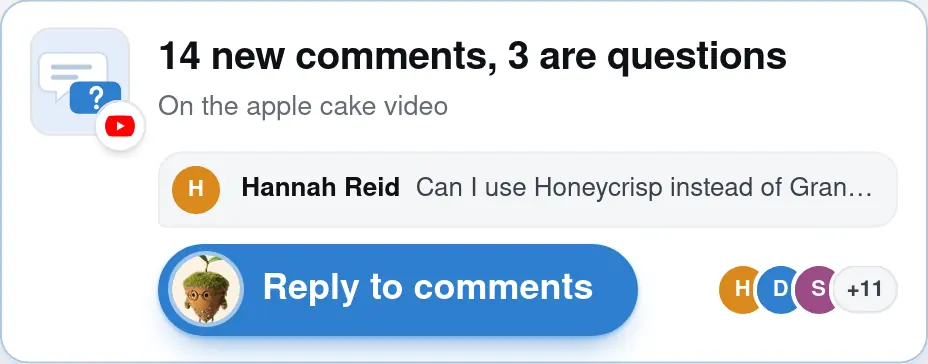


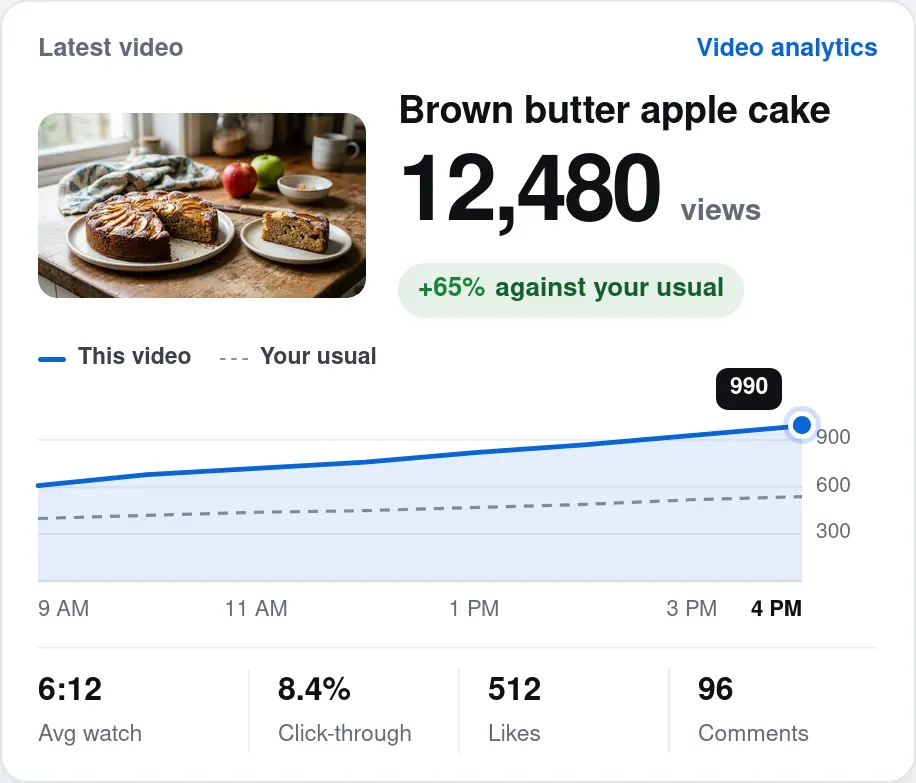
Maya’s dashboard for her baking channel, built around it and updated from her accounts: what matters and what needs doing at a glance, each task with its own button.
A chat
How is my baking channel doing this week?
Your latest video, the brown butter apple cake, has 12,480 views, about 65% more than your usual.
You have 14 new comments, and 3 of them are questions. 9 people asked for the recipe, and the video is picking up views on Pinterest.
Want me to draft replies to the questions?
Message
In ChatGPT, you ask, then read the answer. A chart or a page comes when you ask for one.
A plan for every task
Biom
 Reply to the sponsorPlan
Goal
Say yes to the $1,200 video and lock a filming day.
What I found
Flour brand
Sponsored video
$1,200
Reply by Friday
 This weekend
Fri23Sat24Sun25
Saturday is open
Sponsor rate
+50%Steps
- 1Reply yes and ask for their briefReplyDraft below
- 2Hold Sat 9 AM for filmingSat249 AMFilming
- 3Add $1,200 to October’s expected earnings
$761$1,961October - 4Remind you Friday if they haven’t answeredFri 23If no answer
What I’ll send
To Flour brandSubject Re: Sponsored video
Thanks so much for thinking of me!
I’d love to make the video for $1,200.
I can film this Saturday morning.
Could you send over your brief?
Sending…Sent
For every task it finds, Biom drafts a plan like this on its own and draws it on your dashboard: the goal, what it found, the steps and the email it will send. You approve it or change it.
A chat
Can you help me reply to the flour brand’s sponsor email?
Here’s a plan. Goal: say yes to the $1,200 video and lock a filming day.
What I found: they offer $1,200 for one sponsored video and want a reply by Friday. Saturday is open on your calendar, and $1,200 is 50% above your usual $800.
Steps: 1. Reply yes and ask for their brief. 2. Hold Sat 9 AM for filming. 3. Add $1,200 to October’s expected earnings. 4. Remind you Friday if they haven’t answered.
Draft: “Thanks so much for thinking of me! I’d love to make the video for $1,200. I can film this Saturday morning. Could you send over your brief?”
Want me to send it?
Message
In ChatGPT, a plan comes as text in the chat, after you ask for it.
ChatGPT makes visuals too, as of October 2026. Visualize turns a question into a chart, map, diagram or calculator inside a chat; Space holds pages, slides and spreadsheets you write with it; and Sites builds a website or tool, which in a workspace can show data from connected apps. The difference is where they live and how they stay current: in ChatGPT you ask for a visual, and a chart in a chat is a snapshot of that moment. Biom builds one dashboard around your ongoing project and keeps it up to date on its own.
How much setup does each one need?
Biom needs your accounts linked and one sentence about what you’re working on. It builds the dashboard and finds the work on its own, with nothing else to set up. Getting close to that in ChatGPT, as of October 2026, takes setup you do yourself:
- Install and connect a plugin for each app you use, such as Gmail, Google Calendar or Google Drive.
- Write the instructions: what to check, how often, and when something needs you.
- Create a scheduled task for each check, testing its prompt first. Tasks run on a timer or on a new Gmail, Slack or GitHub event, and a Slack task needs ChatGPT added to every channel it watches.
- Read the results in a chat or a notification. For a page that stays and updates, build a Site and connect it to your data.
ChatGPT’s dot, on Pro (from $100 a month) and Business Premium, comes closest: once you connect your apps, it suggests where it can help from its first conversation. You still tell it what to watch, since connecting an app alone starts no monitoring, and it reports back in a conversation rather than on a dashboard. Each step works; together they take setup most people who aren’t technical never get to.
How Biom and ChatGPT compare
As of October 2026.
| What | Biom | ChatGPT |
|---|---|---|
| Setup | Link your accounts and say what you’re working on. Biom builds the dashboard and finds the work itself: no prompts, automations or schedules to set up. | You set it up yourself: connect a plugin for each app, write what to check and when to tell you, and create a scheduled task for each check. A dot (Pro, Business Premium) suggests where it can help from the start, but you still tell it what to watch. |
| Plans | For every task it finds, it drafts the plan on its own: the goal, what it found, the steps and the drafts, drawn as a visual plan on your dashboard. You approve it or change it. | Plans and drafts come as text in a chat when you ask for them. ChatGPT Work lets you follow progress and approve important actions, and a dot asks before actions that need you, all in a conversation. |
| One place to look | Everything from your connected accounts is tracked on one dashboard, with what matters most moved to the top automatically, so you don’t go hunting across apps or past chats. | Answers and task results arrive in separate chats and notifications; an Activity view lists chats that are unread, running or waiting for you, and a dot can be told which changes need you. Space gathers pages and files in one place. |
| A dashboard built for you | Builds a visual dashboard around your project from one sentence: your numbers, your latest work and what needs doing, laid out to read at a glance. | Answers in a chat. Visualize draws a chart, map or diagram into the chat when you ask; Space holds pages, slides and spreadsheets; Sites builds a website or tool. |
| Updates itself | Sorts through your connected accounts every day on its own and puts what matters on top. | A chart in a chat is a snapshot of when it was made, not a live dashboard. To keep something current, you build a Site on your data or schedule a task to redo it. |
| Finds work on its own | Keeps an eye on your connected accounts and turns what needs doing into tasks on your dashboard, each with its own button. | Scheduled tasks run on a timer or when a new Gmail, Slack or GitHub event arrives. On Pro and Business Premium, a dot, ChatGPT’s always-on assistant, works between conversations and suggests next steps from your connected apps. |
| Approval before it acts | Every task opens as a plan with its drafts. Nothing is sent until you approve it, or change it with your assistant first. | By default it asks before sending a message for you. A dot checks each action against your instructions and custom rules, and a rule can let some actions run without asking. |
| Connecting your accounts | Connects to the apps you use, including YouTube, Instagram, Gmail, Google Calendar, Google Drive, Google Sheets, Shopify and WhatsApp, on every plan. | Plugins connect apps such as Gmail, Google Drive and Slack, on the web, desktop and mobile. |
| What it’s for | One ongoing project, and the work that keeps coming back in it. | Almost anything: questions, writing, research, code and more. |
| Available | Not yet: waitlist only, with no launch date. | Now. Dots are rolling out gradually. |
| Price | Free, $0: your own AI subscription and your accounts connected, on your own computer. Personal, $20 a month, and Power, $50 a month: Biom Assistant, working 24/7 in the cloud. | Free, $0. Go, $8 a month. Plus, $20 a month. Pro, $100, $200 or $500 a month. Business, $25 a user a month, or $20 billed annually. |
ChatGPT’s details are from OpenAI’s own documentation, read October 20, 2026. Its features change often.
Can I use Biom with ChatGPT?
Yes. Biom’s Free plan runs on the AI subscription you already have, and ChatGPT is one of them, so you can keep ChatGPT and use Biom with it for $0. If you’d rather not bring a subscription, Personal includes Biom Assistant for $20 a month.
Questions? Read the FAQ
Join the Waitlist